接續此篇。
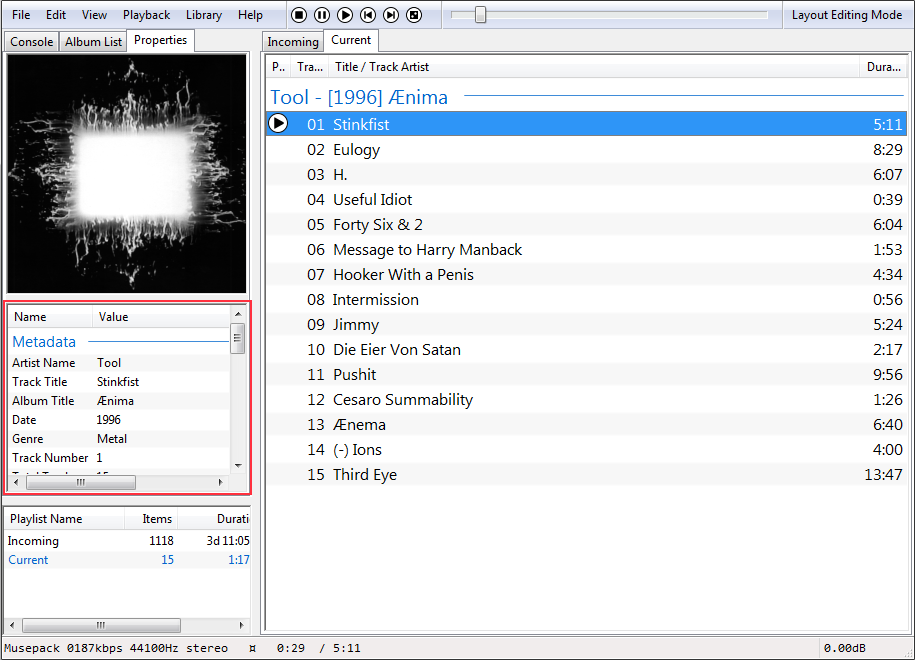
- wvunpack -s filename.wv
- Winamp 的「檢視檔案資訊」

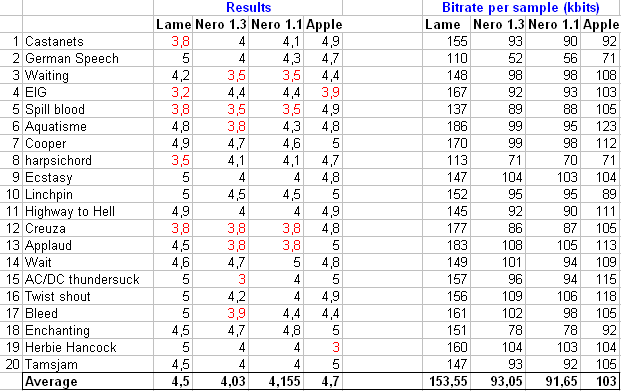
此項測試來自 IgorC 發表於 Hydrogenaudio 的個人聽感測試,供作參考。此篇詳細內容仍請參照前述連結。
使用編碼:
LAME 3.98.2 -V 5
Nero 1.1.34 -q 0.325
Nero 1.3.3 -q 0.31
Apple QuickTime 7.5.5 AAC ( true VBR at 96 kbits, highest quality settings)
位元率比較: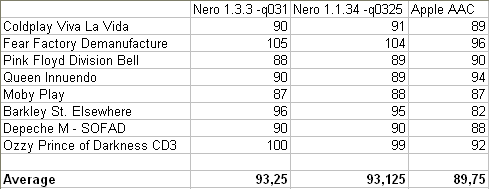

客人 craigtao 提到這個問題,開個主題解答。
Amazon:256kbps CBR LAME 3.91 / 256kbps CBR LAME 3.97 /
VBR V0 LAME 3.97 / 256kbps CBR FhG
Beatport:320kbps CBR LAME 3.97
CD Baby:VBR V2 LAME 3.96r
Downloadpunk:192kbps CBR LAME 3.97 / 192kbps CBR FhG
eMusic :VBR V2 Lame 3.96
iTunes:256kbps CBR AAC / 128kbps CBR AAC
Play:320kbps CBR LAME 3.96 / 192kbps CBR LAME 3.96
Rhapsody:256kbps CBR LAME 3.91
Sony Music Pass:320kbps CBR LAME 3.98
隨時新增。
Worm.Win32.GetCodec.a / TROJ_MEDPINCH.A / Trojan.ASF.Hijacker.gen
此蠕蟲會修改 MP3 將之轉為 WMA,但不會改變其副檔名,並在該檔案加入惡意連結。一旦使用者開啟檔案,會發出警告缺少 audio codec 和要求安裝,如果使用者同意安裝,就會中毒。
受到感染會降低檔案音質。除了 Windows Media Player,其它播放軟體不受此漏洞影響。請多加注意電腦 MP3 檔案、影片的安全,開啟前,請先檢查。
相關閱讀:
Kaspersky Lab reports new worm that infects audio files
Infectious Music, Malware-Style
相關討論:
竄改 MP3 蠕蟲
經過近兩年的測試與開發,LAME 3.98 終於釋出正式版。正式版的 VBR 模式預設為 VBR-New。
Anton Sergunov:
‧Frontend DirectShow: enabling LAME dshow filter to connect to
"File Writer Filter".
Rogério Brito:
‧Updates to the Debian Packaging
‧Fixes to the abx tool for Unix systems (so that more people can evaluate
LAME's compression against the original files)
Alexander Leidinger:
‧explicitely link the math lib to the lame lib
‧add switch to disable the use of the compaq optimized math lib
下載/原始碼/網頁
重新檢證 Hydrogenaudio Forums 的言論,得到了新的結果。
修正要項:
‧iTunes AAC 預設模式仍為 CBR(固定) 模式。已知要項:
‧iTunes 7.5.0.20 的位元率顯示為真實位元率,而非目標位元率。此項
變動已於之後版本修正回原先目標位元率顯示。
‧全模式編碼為新設計。小發現:
‧CBR 以外的模式,位元率的起伏比舊版本大許多。
‧7.3 版 CBR 模式比起 7.2 版,更為遵循目標位元率控制。
‧iTunes Store 購買的 DRM-Free AAC 256kbps,使用模式為 CBR。─────────────────────────────
Average Bit Rate (ABR)
推薦給在乎檔案大小的使用者。
提供平均水平的位元率。不同於 CBR 模式,當使用固定的位元率傳輸時,此模式不提供固定的延遲。比起 CBR 模式,在提供高音質的同時,仍然能夠嚴格控制檔案大小及較低的複雜性。
Constant Bit Rate (CBR) - 預設模式
適用於串流播放。
這種模式實現了一個穩定的位元率。在解碼的同時保持固定的點對點音頻延遲,適合於固定位元網路傳輸。
Variable Bit Rate (VBR)
推薦給控制音質的使用者。
音頻信號的編碼與穩定(可設定)的品質,幾乎沒有任何位元率的限制。可以根據音頻信號的複雜度做適當的調整,達到檔案空間的最佳利用及穩定的品質。並且,在所有的編碼方式中其複雜性是最低的。
Variable Bit Rate But Constrained (VBR_Constrained)
界於 VBR 與 ABR 之間。
這種模式類似 VBR,但限制了平均位元率變化。下限為使用者選定的位元率。高位元率則依照複雜音軌做適當的調整,檔案大小最大會比 ABR 模式大上 10 %。
註:Mac 系統的 QuickTime 7.3 可使用所有模式,而 iTunes 7.5 只可使用 CBR 及 VBR_Constrained 模式。
Has the iTunes AAC encoder changed recently? - Hydrogenaudio Forums
WavPack 這次更新較為重大,在 Winamp plugin 方面,轉換、Tag 上開始完全支援 Unicode。建議升級替換。
下載
WavPack command-line encoder version 4.50b
‧dynamic noise shaping standard in hybrid mode (except when -cc
specified or high sampling rates)
‧param added to -s option (-sd) to force dynamic shaping when not
otherwise selected (--dns from the alpha deprecated)
‧added --channel-order option to specify channel order when it
doesn't match Microsoft standard
‧added --merge-blocks option for use with --blocksize option when
compressing LossyWAV output or decoded HDCD audio
‧increased minimum for --blocksize option to 128 (or 16 when
combined with --merge-blocks)
‧reformatted and expanded --help display
WavPack plugin for Winamp version 2.5b
‧added transcoding API (allows CD burning, format conversion,
Replaygain calc)
‧allow standard Winamp metadata display and editing to work
‧added API for writing metadata from Winamp (for Auto-Tag, etc.)
‧Unicode support for info box (older Winamps) and media library
‧added option to pass multichannel audio to output
‧added option to pass all audio as 16-bit (for better compatibility)
‧added option to output 24-bit audio when ReplayGain is active
‧changed high-resolution output from 32-bit to 24-bit (allows
winamp EQ to work, and probably other things)
‧improved performance of adding tracks to library, especially from
network drives
‧fixed bug that caused the seek bar to sometimes vacillate when
moved
‧added genre display to info box (for older Winamps)